Borut Jures
Author of ArcEHR
View all authors

My openEHR CDR was 15x slower than the competition... or so I thought

· 2 min read
Borut Jures
Author of ArcEHR

A week ago I noticed my openEHR Clinical Data Repository (CDR) felt a bit sluggish. Naturally, I benchmarked it against EHRbase.

The results were brutal:

❌ My CDR: 15 ms to commit a composition

⚡ EHRbase: 1 ms

Humble pie served. I immediately went down the profiling rabbit hole to figure out where my architecture was bleeding performance. After two days of profiling, I accepted that the best I could do with my CDR was 6 times slower than EHRbase.

Fast forward to today: I started benchmarking read performance. To do that, I needed the UIDs of the inserted EHRs and compositions. But EHRbase wasn't returning them in the response body.

That’s when the dominoes started falling:

  • I was expecting openEHR REST API 1.1.0 responses, but EHRbase follows 1.0.2 (which returns UIDs in the ETag response header).
  • While investigating responses, I noticed something strange: EHRbase was also returning errors on every single EHR creation.
  • The issue? EHRbase expects an EHR_STATUS with PERSON, whereas the latest spec example uses PARTY_SELF.

The plot twist: That 1 ms benchmark wasn't committing compositions at lightning speed. It was just reporting creation errors in record time. The contributions were never actually processed. 😂

Once I fixed the payload and reran the benchmarks properly:

🐢 EHRbase real speed: 9.62 ms

⚡ My optimized CDR: 4.43 ms

The first test involves creating 100 EHRs, each with 1000 compositions. I’m using an 885-line Vital signs composition to make the test realistic:

Total mm:ssper composition
EHRbase16:029,62 ms
ArcEHR7:224,43 ms

The second test is querying the compositions using all seven different ways to use the GET COMPOSITION endpoints (700k queries):

Total mm:ssper composition
EHRbase30:5518,56 ms
ArcEHR4:312,72 ms

I’m running this on my 5-year-old Apple M1 Pro with 16 GB RAM, while simultaneously running 3 IDEs and Docker.

Moral of the story: Always check your HTTP status codes before you start questioning your entire architecture.
How Source Code Access Cut openEHR CDR Query Times to O(1)

· 2 min read
Borut Jures
Author of ArcEHR

Judging openEHR CDR performance is tough. You can stress-test by inserting millions of compositions and benchmarking queries. But even if it feels fast, how do you know it can’t be faster?

When I finished my openEHR CDR, it was hitting 15ms per committed composition. Humanly fast—but I wanted to test the limits.

Because ArcEHR gives customers full source code access—and uses an open-source database written in the same language—I ran the IntelliJ IDEA profiler across the entire stack.

The Profiler's Trail

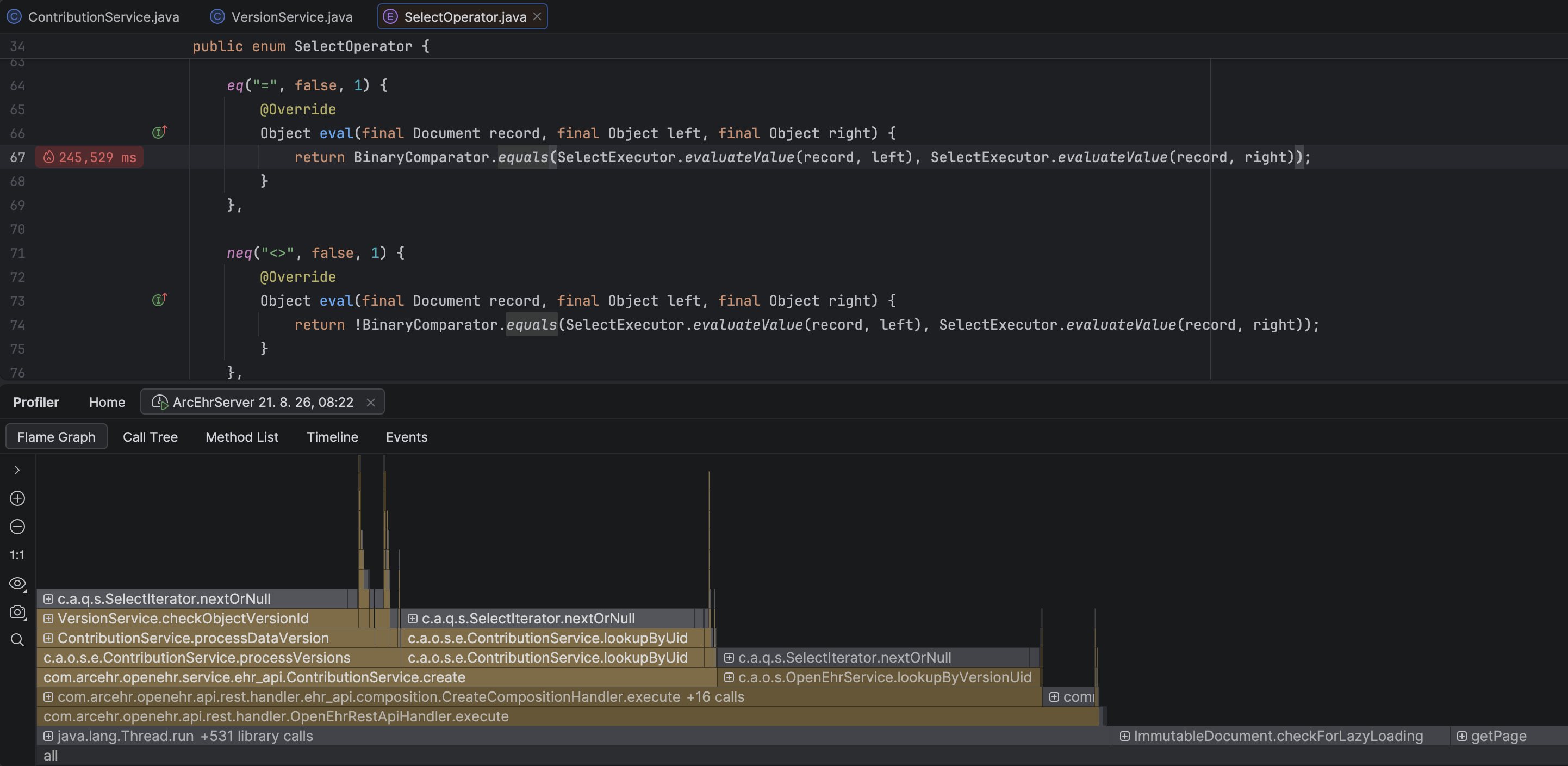
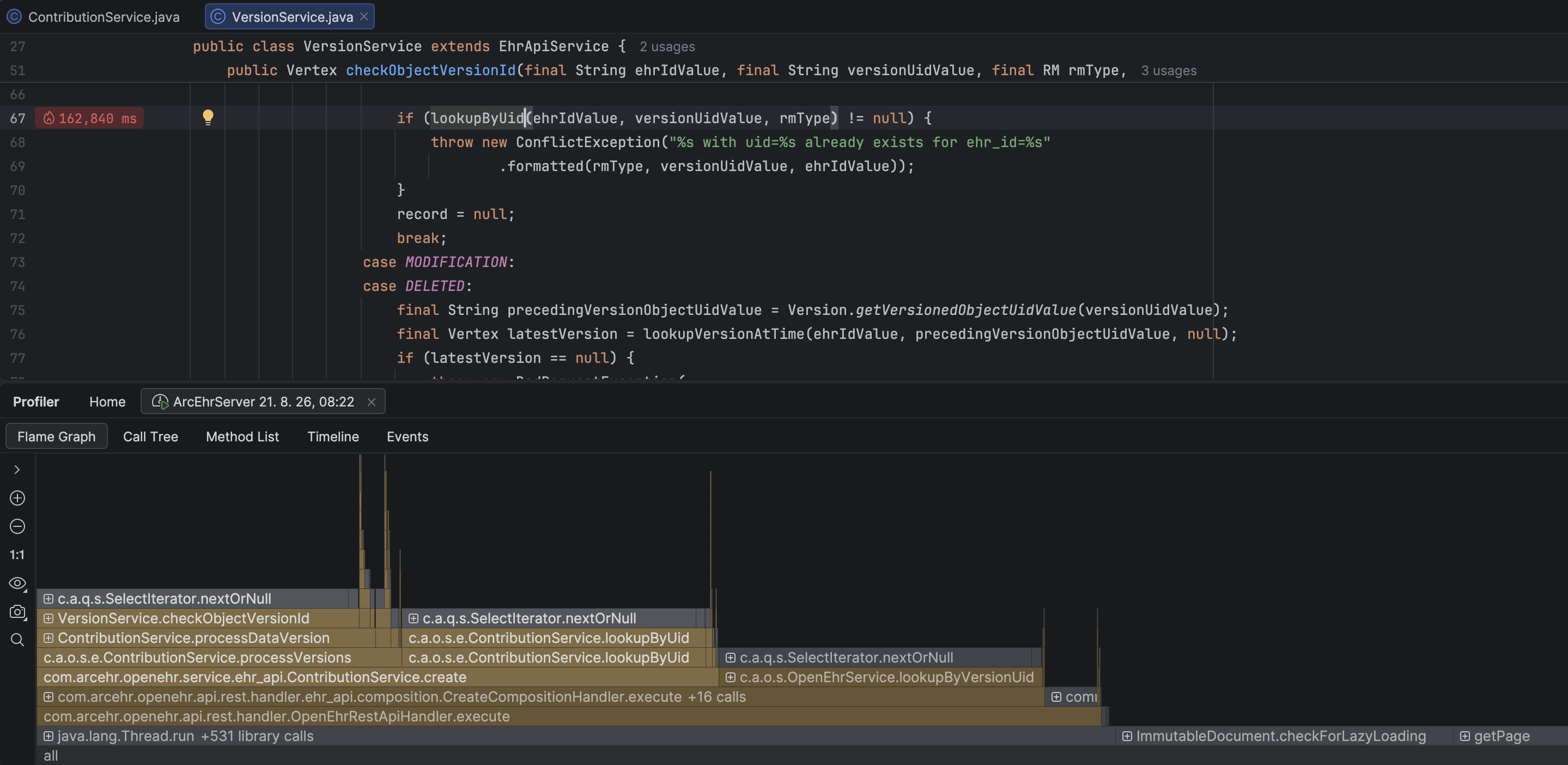
  1. The flame graph pointed to high execution time inside CreateCompositionHandler:

Check for duplicate UID

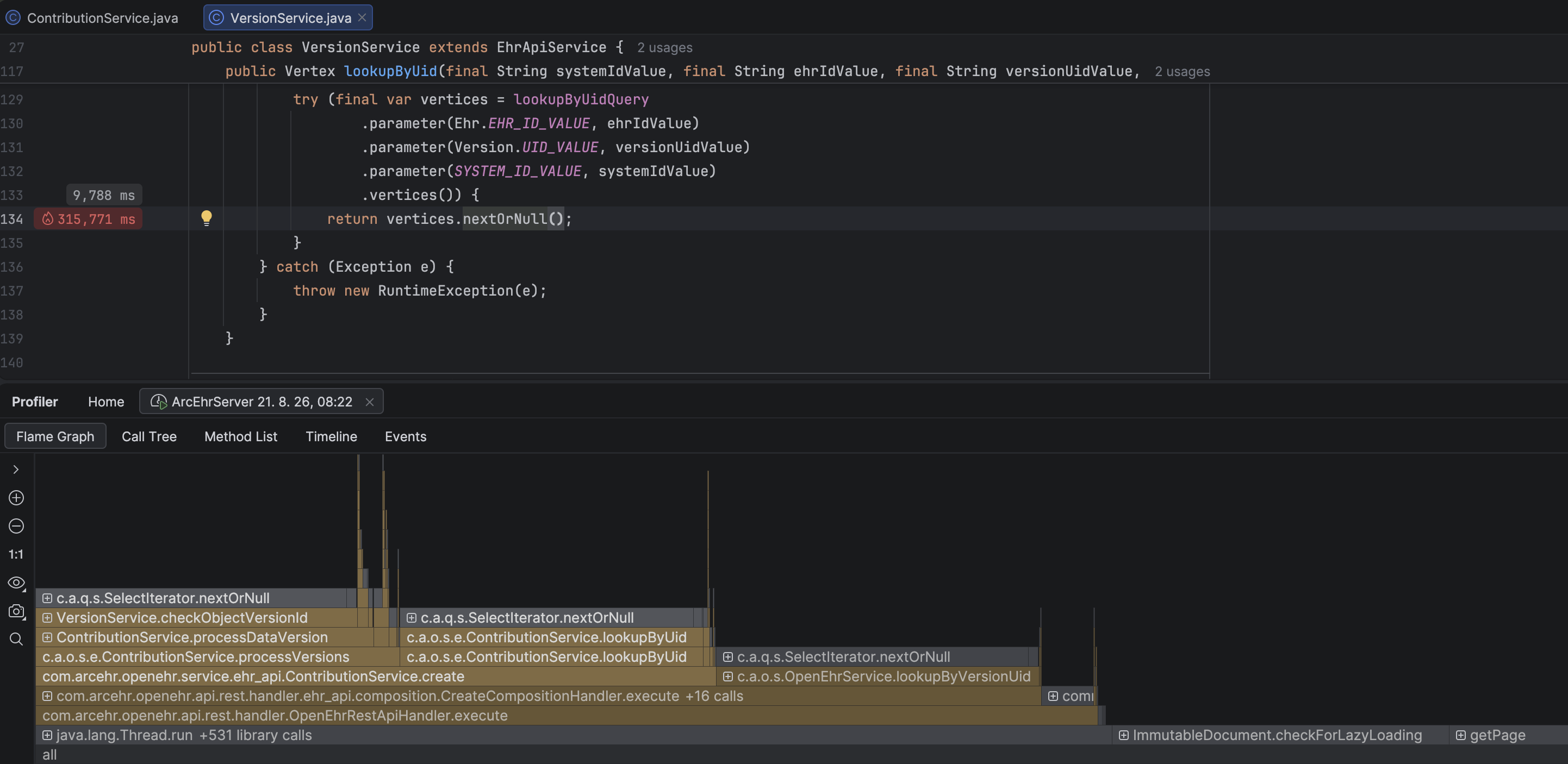
  1. Drill-down revealed the culprit: lookupByUid(), an innocent check to see if a UID already exists.

lookupByUID method

  1. Following the query into the database engine exposed why the SQL query was lagging.

Database engine SQL equals condition evaluator

The Fix

The UID lookup index was using an LSM Tree. Switching to a Hash Index brought lookup time down to O(1)—ensuring lookups stay instant no matter how large the CDR grows.

Conclusion

Why source code matters: Without visibility into the full stack, a bottleneck like this remains invisible. Source code access turns black-box performance limits into solvable engineering problems.

Have you encountered performance bottlenecks or scaling issues with your openEHR CDR? How are you profiling your health data architecture?

Tired of AQL to fetch openEHR data?

· 4 min read
Borut Jures
Author of ArcEHR

Traditionally, querying hierarchical and deeply nested openEHR Reference Model (RM) data requires using AQL (Archetype Query Language).

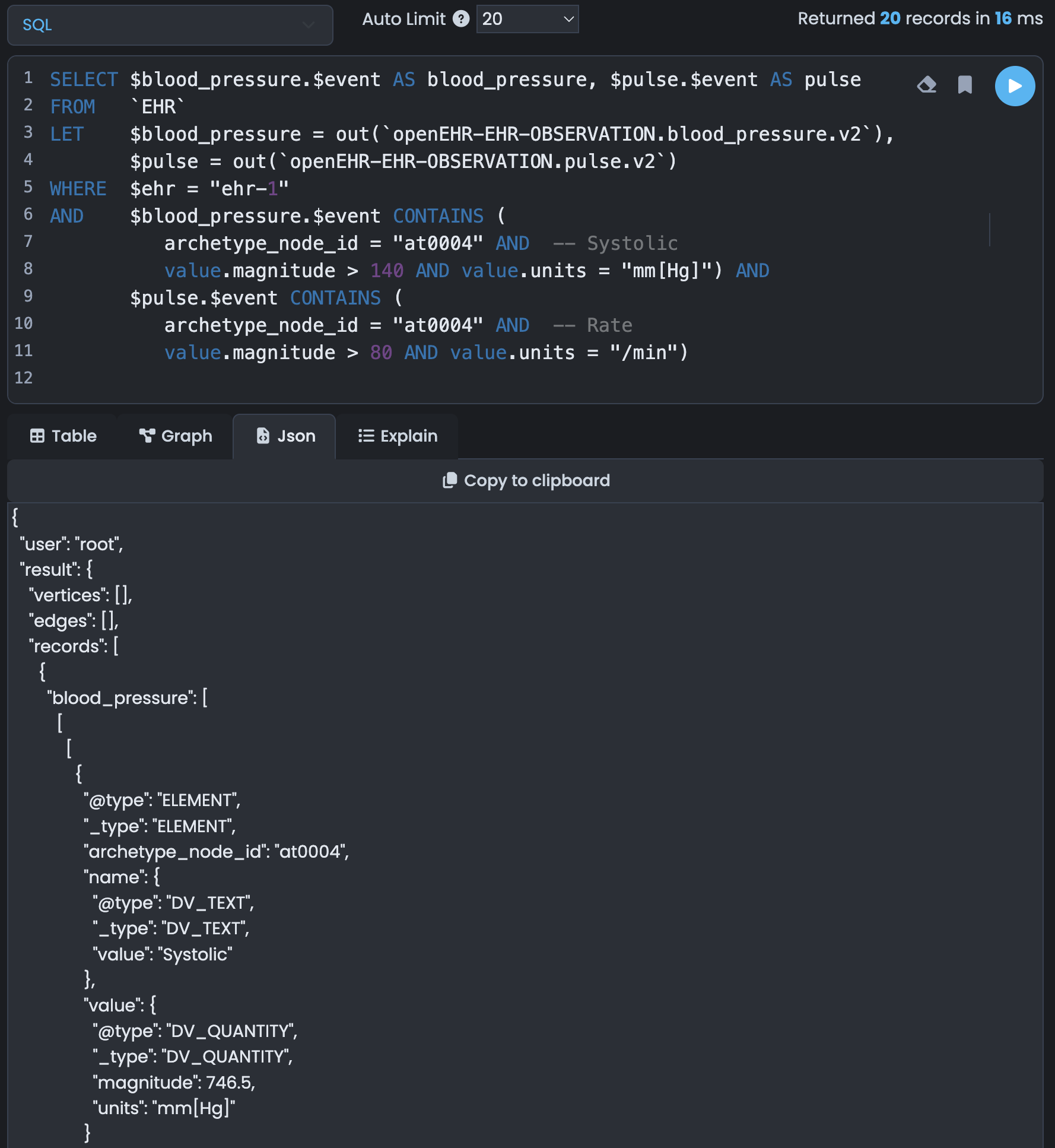
In ArcEHR, we map the openEHR Reference Model directly to a graph database using ArcadeDB. It also comes with a free and open-source data browser ArcadeDB Studio.

ArcadeDB Studio

Best of all? You can still query and manipulate this graph data using standard SQL through any PostgreSQL GUI client or library.

Here is a quick look at how INSERT and SELECT work under the hood.

tip

You can use your preferred PostgreSQL client to work with the ArcEHR database.

Developers can use their preferred PostgreSQL library to work with the ArcEHR database.

Inserting openEHR Data

To insert openEHR data, we use a simple SQL INSERT statement targeting the create_composition table. Behind the scenes, a database trigger automatically processes this payload, shredding the JSON and storing the composition directly into RM Document nodes and relationship edges.

INSERT INTO create_composition (ehr_id, content) VALUES ("ehr-1", {
"archetype_node_id": "openEHR-EHR-COMPOSITION.encounter.v1",
"name": {"value": "Vital Signs"},
"uid": {"_type": "OBJECT_VERSION_ID", "value": "8849182c::openEHRSys.example.com::1"},
"archetype_details": {
"archetype_id": {"value": "openEHR-EHR-COMPOSITION.encounter.v1"},
"template_id": {"value": "Example.v1::c7ec861c-c413-39ff-9965-a198ebf44747"},
"rm_version": "1.0.2"
},
"language": {"terminology_id": {"value": "ISO_639-1"}, "code_string": "en"},
"content": [{"_type": "COMPOSITION"}]
})

The schema of our create_composition table strictly mirrors the openEHR REST API, keeping integration painless.

FieldTypeRequiredDefaultAllowed values
ehr_idSTRINGMandatory
preferSTRINGOptionalreturn=minimalreturn=(representation|minimal|identifier)
acceptSTRINGOptionalapplication/jsonapplication/(json|xml)
content_typeSTRINGOptionalapplication/jsonapplication/(json|xml)
openehr_item_tagARRAYOptional-
openehr_version_item_tagARRAYOptional-
contentSTRINGMandatory

Querying openEHR Data (Zero Joins Needed)

Because this is a graph database, we use the database's native out() function to traverse edges. To find all blood pressure records for an EHR or Composition, we simply traverse the corresponding edge. No JOINs, no performance degradation as your dataset grows.

Scenario A: Simple SELECT with One Archetype

Let’s fetch the blood pressure data for a specific EHR:

SELECT $blood_pressure.$event AS blood_pressure
FROM EHR
LET $blood_pressure = out(`openEHR-EHR-OBSERVATION.blood_pressure.v2`)
WHERE $ehr = "ehr-1"

Result:

{
"blood_pressure": [[[
{"_type": "ELEMENT", "archetype_node_id": "at0004",
"name": {"_type": "DV_TEXT", "value": "Systolic"},
"value": {"_type": "DV_QUANTITY",
"magnitude": 140.5,
"units": "mm[Hg]"
}
},
{"_type": "ELEMENT", "archetype_node_id": "at0005",
"name": {"_type": "DV_TEXT", "value": "Diastolic"},
"value": {"_type": "DV_QUANTITY",
"magnitude": 80.1,
"units": "mm[Hg]"
}
}
]]]
}

Scenario B: Querying Multiple Archetypes with Filters

What if we want both blood pressure and pulse for a patient, filtered by specific clinical thresholds?

We can leverage the CONTAINS operator to traverse and filter nested collections in a single, readable query:

SELECT $blood_pressure.$event AS blood_pressure, $pulse.$event AS pulse
FROM EHR
LET $blood_pressure = out(`openEHR-EHR-OBSERVATION.blood_pressure.v2`),
$pulse = out(`openEHR-EHR-OBSERVATION.pulse.v2`)
WHERE $ehr = "ehr-1"
AND $blood_pressure.$event CONTAINS (
archetype_node_id = "at0004" AND -- Systolic
value.magnitude > 140 AND value.units = "mm[Hg]")))
AND $pulse.$event CONTAINS (
archetype_node_id = "at0004" AND -- Rate
value.magnitude > 80 AND value.units = "/min")))

This returns a clean, structured JSON object containing both clinical data points simultaneously—without a single SQL JOIN:

{
"blood_pressure": [[[
{"_type": "ELEMENT", "archetype_node_id": "at0004",
"name": {"_type": "DV_TEXT", "value": "Systolic"},
"value": {"_type": "DV_QUANTITY",
"magnitude": 140.5,
"units": "mm[Hg]"
}
},
{"_type": "ELEMENT", "archetype_node_id": "at0005",
"name": {"_type": "DV_TEXT", "value": "Diastolic"},
"value": {"_type": "DV_QUANTITY",
"magnitude": 80.1,
"units": "mm[Hg]"
}
}
]]],
"pulse": [[[
{"_type": "ELEMENT", "archetype_node_id": "at0004",
"name": {"_type": "DV_TEXT", "value": "Rate"},
"value": {"_type": "DV_QUANTITY",
"magnitude": 83.7,
"units": "/min"
}
}
]]]
}

Developer Tooling

If you want to visualize your graph traversals, you can use the open-source ArcadeDB Studio browser to run and analyze your queries visually. Or, simply stick to your favorite PostgreSQL client and libraries — ArcEHR speaks PostgreSQL natively.

TypeScript PostgreSQL for openEHR data

· 5 min read
Borut Jures
Author of ArcEHR

One of the biggest hurdles in healthtech development is the sheer complexity of querying hierarchical clinical schemas. Usually, this means learning complex, niche query languages.

If you are using ArcEHR, you don't need any of that. You can query and insert graph-mapped openEHR data using the standard, vanilla pg library in TypeScript.

Because ArcEHR presents a PostgreSQL-compatible interface over ArcadeDB, your existing database drivers, parameterized queries, and connection pools work out of the box.

Here is how easily you can handle openEHR CRUD operations in TypeScript:

1. The Setup

No custom database clients required. Just import the standard pg driver, initialize your client, and connect.

import { Client } from 'pg'
const client = await new Client({
database: 'arcehr',
port: 5432,
user: 'root',
password: 'arcadedb'}).connect()

2. Inserting openEHR Data with Type Safety

When inserting openEHR data, you pass your structured JSON payload directly as a parameterized query. A trigger on the create_composition table handles the heavy lifting, automatically shredding the JSON into RM Document types and graph edges.

// Insert a new composition
const content = {
archetype_node_id: 'openEHR-EHR-COMPOSITION.encounter.v1',
name: {value: 'Vital Signs'},
uid: {_type: 'OBJECT_VERSION_ID', value: '8849182c::openEHRSys.example.com::1'},
archetype_details: {
archetype_id: {value: 'openEHR-EHR-COMPOSITION.encounter.v1'},
template_id: {value: 'Example.v1::c7ec861c-c413-39ff-9965-a198ebf44747'},
rm_version: '1.0.2',
},
language: {terminology_id: { value: 'ISO_639-1' }, code_string: 'en'},
content: [{ _type: 'OBSERVATION' }]
}
const insert = `INSERT INTO create_composition (ehr_id, content) VALUES ($1, $2)`
await client.query(insert, ['ehr-1', content])

The Response: You receive a clean response back, confirming the target EHR and returning the database record ID (@rid):

{
ehr_id: 'ehr-1',
content: '{"archetype_node_id":"openEHR-EHR-COMPOSITION.encounter.v1","name":{"value":"Vital Signs"},"uid":{"_type":"OBJECT_VERSION_ID","value":"8849182c::openEHRSys.example.com::1"},"archetype_details":{"archetype_id":{"value":"openEHR-EHR-COMPOSITION.encounter.v1"},"template_id":{"value":"Example.v1::c7ec861c-c413-39ff-9965-a198ebf44747"},"rm_version":"1.0.2"},"language":{"terminology_id":{"value":"ISO_639-1"},"code_string":"en"},"content":[{"_type":"COMPOSITION"}]}',
prefer: 'return=minimal',
content_type: null,
accept: null,
'@rid': '#72:1'
}

3. Querying openEHR Data (Zero-Join Graph Traversal)

Because ArcEHR stores this data as a graph under the hood, we can traverse nested clinical paths in a single query without performance-killing relational JOINs.

Scenario A: Fetching Blood Pressure

Lets pull all blood pressure records for a specific EHR. Note how we use standard $1 placeholders to prevent SQL injection:

const select = `SELECT $blood_pressure.$event AS blood_pressure
FROM EHR
LET $blood_pressure = out("openEHR-EHR-OBSERVATION.blood_pressure.v2")
WHERE $ehr = $1`
await client.query(select, ['ehr-1'])

Resulting JSON: You get back clean, structured openEHR Reference Model JSON elements directly in your application:

{
blood_pressure: [[[
{"@type":"ELEMENT","_type":"ELEMENT","archetype_node_id":"at0004","name":{"@type":"DV_TEXT","_type":"DV_TEXT","value":"Systolic"},"value":{"@type":"DV_QUANTITY","_type":"DV_QUANTITY","magnitude":746.5,"units":"mm[Hg]"}},
{"@type":"ELEMENT","_type":"ELEMENT","archetype_node_id":"at0005","name":{"@type":"DV_TEXT","_type":"DV_TEXT","value":"Diastolic"},"value":{"@type":"DV_QUANTITY","_type":"DV_QUANTITY","magnitude":526.1,"units":"mm[Hg]"}}
]],[[
{"@type":"ELEMENT","_type":"ELEMENT","archetype_node_id":"at0004","name":{"@type":"DV_TEXT","_type":"DV_TEXT","value":"Systolic"},"value":{"@type":"DV_QUANTITY","_type":"DV_QUANTITY","magnitude":746.5,"units":"mm[Hg]"}},
{"@type":"ELEMENT","_type":"ELEMENT","archetype_node_id":"at0005","name":{"@type":"DV_TEXT","_type":"DV_TEXT","value":"Diastolic"},"value":{"@type":"DV_QUANTITY","_type":"DV_QUANTITY","magnitude":526.1,"units":"mm[Hg]"}}
]]]
}

Scenario B: Multi-Archetype Queries with Path Filtering

What if you need to fetch both blood pressure and pulse, but only return records where the patient's vitals exceed specific safety thresholds?

We use the CONTAINS operator to query inside the nested clinical arrays:

const select = `SELECT $blood_pressure.$event AS blood_pressure, $pulse.$event AS pulse
FROM EHR
LET $blood_pressure = out("openEHR-EHR-OBSERVATION.blood_pressure.v2"),
$pulse = out("openEHR-EHR-OBSERVATION.pulse.v2")
WHERE $ehr = $1
AND $blood_pressure.$event CONTAINS (
archetype_node_id = "at0004" AND -- Systolic
value.magnitude > 140 AND value.units = "mm[Hg]")
AND $pulse.$event CONTAINS (
archetype_node_id = "at0004" AND -- Rate
value.magnitude > 80 AND value.units = "/min")`
await client.query(select, ['ehr-1'])

Result:

{
blood_pressure: [[[
{"@type":"ELEMENT","_type":"ELEMENT","archetype_node_id":"at0004","name":{"@type":"DV_TEXT","_type":"DV_TEXT","value":"Systolic"},"value":{"@type":"DV_QUANTITY","_type":"DV_QUANTITY","magnitude":746.5,"units":"mm[Hg]"}},
{"@type":"ELEMENT","_type":"ELEMENT","archetype_node_id":"at0005","name":{"@type":"DV_TEXT","_type":"DV_TEXT","value":"Diastolic"},"value":{"@type":"DV_QUANTITY","_type":"DV_QUANTITY","magnitude":526.1,"units":"mm[Hg]"}}
]],[[
{"@type":"ELEMENT","_type":"ELEMENT","archetype_node_id":"at0004","name":{"@type":"DV_TEXT","_type":"DV_TEXT","value":"Systolic"},"value":{"@type":"DV_QUANTITY","_type":"DV_QUANTITY","magnitude":746.5,"units":"mm[Hg]"}},
{"@type":"ELEMENT","_type":"ELEMENT","archetype_node_id":"at0005","name":{"@type":"DV_TEXT","_type":"DV_TEXT","value":"Diastolic"},"value":{"@type":"DV_QUANTITY","_type":"DV_QUANTITY","magnitude":526.1,"units":"mm[Hg]"}}
]]],
pulse: [[[
{"@type":"ELEMENT","_type":"ELEMENT","archetype_node_id":"at0004","name":{"@type":"DV_TEXT","_type":"DV_TEXT","value":"Rate"},"value":{"@type":"DV_QUANTITY","_type":"DV_QUANTITY","magnitude":636.7,"units":"/min"}}
]],[[
{"@type":"ELEMENT","_type":"ELEMENT","archetype_node_id":"at0004","name":{"@type":"DV_TEXT","_type":"DV_TEXT","value":"Rate"},"value":{"@type":"DV_QUANTITY","_type":"DV_QUANTITY","magnitude":636.7,"units":"/min"}}
]]]
}

No database schema migrations, no nested relational mapping code, and no performance loss. Just standard PostgreSQL queries executing lightning-fast graph traversals in Node.js.

The Takeaway

When building modern clinical applications, you shouldn't have to compromise between the rich standards of openEHR and developer-friendly tooling. ArcEHR lets you use the standard Node/TypeScript ecosystem you already know and love to query complex health data seamlessly.

How should we query openEHR data?

· One min read
Borut Jures
Author of ArcEHR

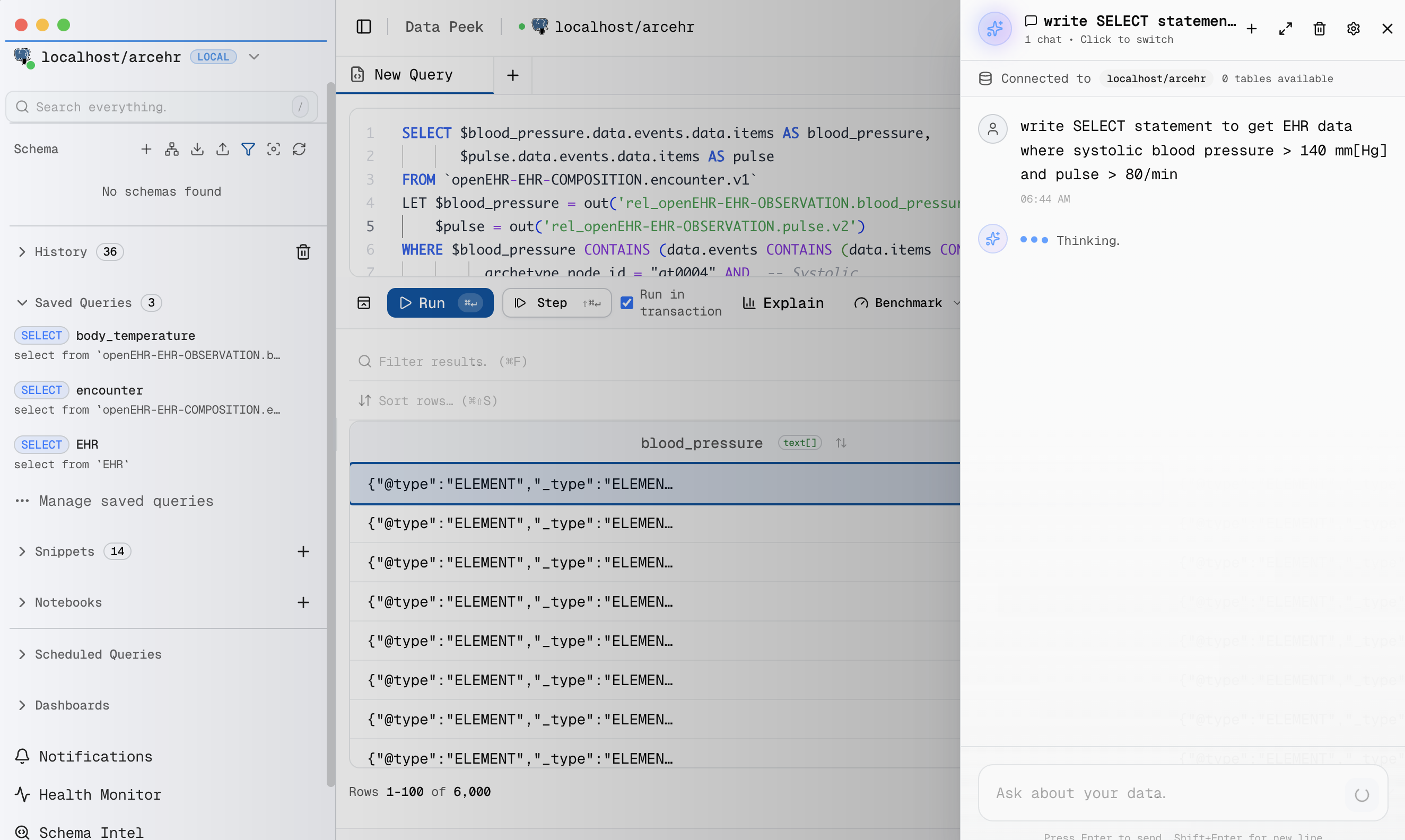
Pablo and Sidharth recently kicked off a great debate: Should we write queries using AQL/SQL, or is a visual query builder the way to go?

I think there’s a third option that is changing the game: Natural Language via AI.

Instead of wrestling with syntax, you type:

Get EHR data where systolic blood pressure > 140 mm[Hg] and pulse > 80/min

In ArcEHR, I use SQL as the main querying language, allowing developers to either write queries by hand or let the integrated AI assistant do the heavy lifting.

Modern LLMs excel at translating intent to precise database queries. If they can navigate complex codebases, a few lines of SQL is a breeze.

What’s your preferred approach for openEHR?

  1. By hand (SQL/AQL) – Complete control and precision.
  2. Visual Builder – Drag-and-drop, low-code, accessible.
  3. AI/Natural Language – Fast, intuitive, zero syntax overhead.

ArcEHR Studio is a great example of the first and third approach in action:

ArcEHR Studio

openEHR with SQL and graph traversal

· 2 min read
Borut Jures
Author of ArcEHR

I made some progress with SQL queries using graph traversal over openEHR data:

COMPOSITION.encounter.v1 has OBSERVATION.blood_pressure.v2

Since ArcEHR maps openEHR Reference Model (RM) to the graph database, we can use graph traversal to query the openEHR data. The data stored in the graph database is much more efficient than the relational database. No joins are needed to retrieve the data. We use out('has_openEHR-EHR-OBSERVATION.blood_pressure.v2') to get all the blood pressure records for a given COMPOSITION or EHR.

Querying an openEHR CDR with SQL, Cypher, and GraphQL? Yes, it’s possible.

· 3 min read
Borut Jures
Author of ArcEHR

If you work with openEHR, you already know Archetype Query Language (AQL). It’s a brilliant technical achievement designed specifically for hierarchical health data.

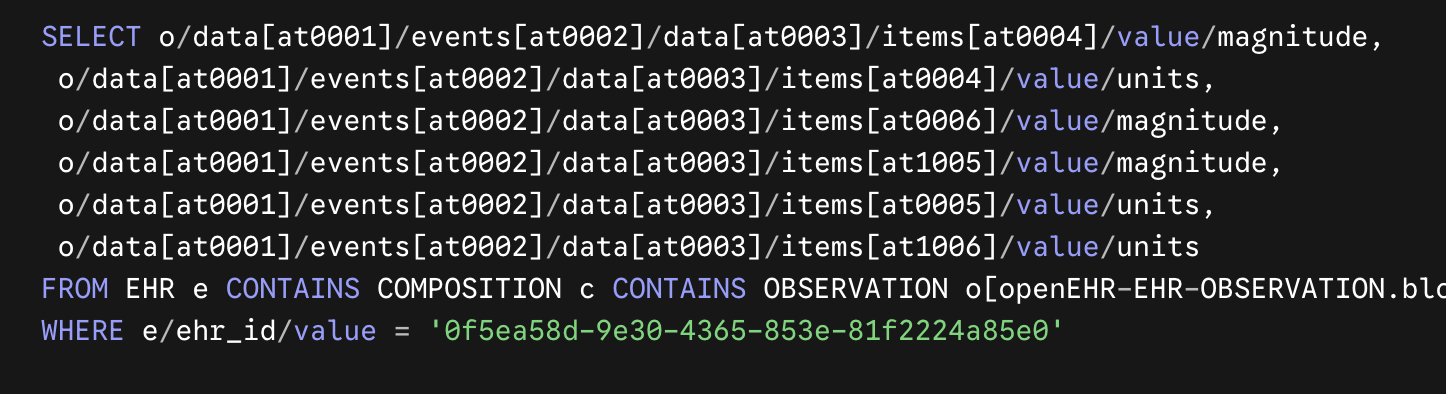
But let’s be honest: most developers and analysts outside the openEHR ecosystem have never heard of it. When onboarding new engineers to a health tech project, teaching them AQL from scratch is a massive bottleneck. Usually, they have to write or look at something like this just to get blood pressure data:

AQL Query

What if you could build an openEHR Clinical Data Repository (CDR) but let your team use the technologies they already know? You can even treat the CDR as a PostgreSQL database.

By leveraging ArcadeDB, we can enable polyglot querying over openEHR data structures. Your developers and analysts can pick the exact query language that fits their background:

openEHR full-stack platform

· 2 min read
Borut Jures
Author of ArcEHR

Is an openEHR CDR without integrated forms a developer’s nightmare? Anyone who has worked with openEHR knows the power of its two-level data model. But they also know the friction: forcing developers to abandon their familiar daily tools, reinvent the wheel for UIs, and grapple with complex data storage.

How can we bridge the gap between openEHR’s complexity and standard rapid application development?

What if we could use:

  • the tools most developers are already familiar with and use daily
  • existing development approaches
  • existing tools and frameworks for UI

What if we didn't have to reinvent the wheel for openEHR projects?

openEHR archetypes as SQL tables

· One min read
Borut Jures
Author of ArcEHR

Sidharth Ramesh proposes openEHR archetypes as SQL tables and I'm one of the few sympathizers of that approach 😊

I tried it with 4 different SQL/ORM libraries, but those pure SQL approaches aren't a good match for openEHR highly hierarchical data.

My current attempt involves implementing the openEHR Reference Model (RM) on ArcadeDB. The POC works well. Users can query using the standard ArcadeDB flavor of SQL in their browsers (all Apache 2.0 licensed).